Showing posts with label 2007. Show all posts

How To Find Your Exchange 2007 version


How To Find Your Exchange 2007 version

The above is a shot of the results after running the command on an Exchange 2007 SP1 system.
Get-ExchangeServer : fl name,edition,admindisplayversion
How to get your Exchange 2007 version. Run the command in an Exchange Management Shell prompt: Get-ExchangeServer : fl name,edition,admindisplayversion

How to View Public Folders in Outlook 2007


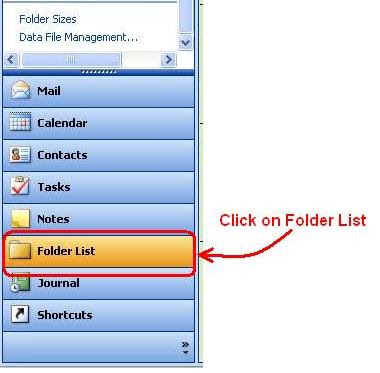
Public Folders are not shown in the default view, you must be using the "Folder List" view in the Navigation Pane to see public folders. To change to the folder list view, click the Folder List button at the bottom of the Navigation Pane, or if you've reduced the number of buttons at the bottom, the folder list button will change to an icon that looks like a file folder.

How to View Public Folders in Outlook 2007

The process to view Public Folders in Outlook is you first need to launch the Outlook application. Once open, navigate to the "Go" menu located at the top of the screen. Within this menu, you'll find an option labeled "Folder List"; select this to proceed. After selecting "Folder List", a sidebar will appear on the left-hand side of the Outlook window. In this sidebar, scroll down until you see "Public Folders". This section houses all the public folders that your organization has set up. Click on the "+" sign next to "Public Folders" to expand and view all available folders. From here, simply select the public folder you wish to access. The content of the chosen public folder will then be displayed in the main pane of the Outlook window. Remember, accessing public folders in Outlook 2007 is a straightforward process that enables you to collaborate and share information within your organization effectively. 

Keep in mind that Public Folder usage will likely be phased out in later releases of Outlook. 

Share/Save/Bookmark


Recommended: Enhance your Support Services with Online Software for Desktop Support. Remotely access and control desktops and servers to provided better support. 

Microsoft HMC 4.5 Deployment Walkthrough - Does it Work

Computer Support - Adventure (Rated PG) Microsoft HMC 4.5 Deployment Walk-through - Does it Work? Microsoft's HMC 4.5 Deployment Walk-through is an excellent document, and I could say that it does work. I found some minor little errors in the doc but none that were significant enough for a person with a good level of experience with Microsoft products. Microsoft's HMC has come a long way since the 3.x versions. The features in Exchange 2007 have increased tremendously and one of the newest and long-awaited capabilities is being able to break out the various functions of the messaging system to different servers much more easily and effectively that previous version of the software. read more 

Can't open attachments with Outlook Web Access (OWA).

http://pctechgo.blogspot.com/2008/09/attachmentashx-message-when-opening.html

This solution did the trick for a client that was having some file attachment issues. The file attachments couldn't be opened or saved. The operating system was Microsoft windows XP and the browser version was IE7 (Internet Explorer 7). The same fix can be applied to a Vista desktop operating system using Internet Explorer 7 (IE7) but the user would have seen a different error message. The fact that in neither case attachments can't be opened for viewing or editing not can attachments be saved with OWA. the Microsoft Exchange server version was Microsoft exchange 2007. There are configuration changes required on the server. This is desktop client side solution. One of the obvious points of how this error if displayed is not a server side problem is that if another browser is used from the same desktop that's not working when using IE7, the other browser such as FireFox works without any setting changes. In addition, other users are not experiencing the same problem.

read more digg story

Microsoft Exchange Server 2003 Installation Checklist (abbreviated version)

Exchange Server 2003 Installation Checklist A nicely outlined list of steps that are involved in installing Microsoft Exchange Email Server in a Microsoft Active Directory Domain environment. If anyone is looking (for any and many reasons) for a description of the steps required, then this post will be helpful. Links to Microsoft Site provided.

read more | digg story

Installing or troubleshooting Microsoft Exchange 2003 or new releases such as Exchange2007 or exchange 2010, remote control programs can be used. Web based remote control software for online remote desktop support of installations or fixing of problems as post installation support.


Featured Post (Selected for You)

Using Microsoft Remote Desktop on a Windows 11 PC - A Step-by-Step Guide

A Step-by-Step Guide to Using Microsoft Remote Desktop on a Windows 11 PC. How to Setup and Access Microsoft Remote Desktop on a Windows 11 ...