More information about Print Management on Windows 2008 Server, including Windows SBS 2008 can be found at http://technet.microsoft.com/en-us/library/cc753109(WS.10).aspx (Since the time of this writing, Microsoft changed names from SBS to Server Essentials)
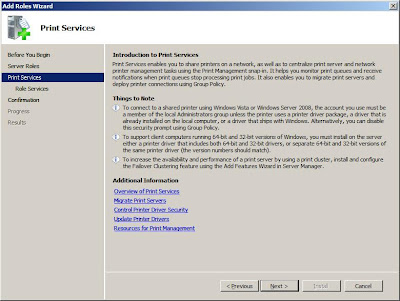 Start with adding te printer services role as shown above. This is done through server manager, click on the roles link in the upper right then select (check the box) Print Services . On the next step you can leave the default for most environments. Print server is the only option selected on a default installation of Printer Services on 2008 server.
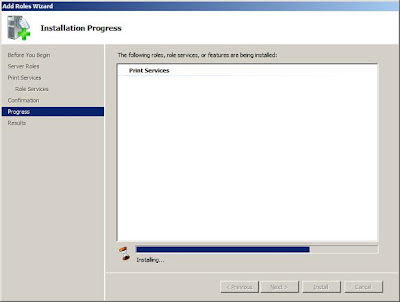
The migrate print server link shown near the bottom of the first/top image in this post has the following information:
To migrate print servers by using Print Management
 Start with adding te printer services role as shown above. This is done through server manager, click on the roles link in the upper right then select (check the box) Print Services . On the next step you can leave the default for most environments. Print server is the only option selected on a default installation of Printer Services on 2008 server.
The migrate print server link shown near the bottom of the first/top image in this post has the following information:
To migrate print servers by using Print Management
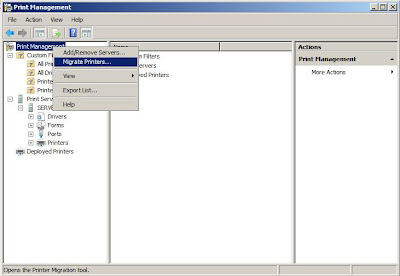
- Open the Administrative Tools folder, and then click on Print Management.
- In the Print Management tree pane , right-click on the name of the computer that has the printer queues that you want to export from (this is your source server), and then click Export printers to a file option. This launches the Printer Migration Wizard.
- On the Select the file location page, specify the location to save the printer settings, and then click Next to save the printers.
- Right-click the destination or target computer (this should be your 2008 server, standard or SBS) on which you want to import the printers and have them accessible for your clients, and then click on the Import printers from a file option. This launches the Printer Migration Wizard.
- On the Select the file location page, specify the location of the printer settings file, and then click Next.
- On the Select import options page, specify the following import options:
Import mode. Specifies what to do if a specific print queue already exists on the destination computer.
List in the directory. Specifies whether to publish the imported print queues in the Active Directory Domain Services.
Convert LPR Ports to Standard Port Monitors. Specifies whether to convert Line Printer Remote (LPR) printer ports in the printer settings file to the faster Standard Port Monitor when importing printers.
- Click Next to import the printers.
___________________________________________
Microsoft RDp has increased in usage. it is used by sysm and server administrators as much as it's used to connect to desktops for users to access applications remotely, such as RDP with RDS (terminal Services). Admins mostly use it for remote administration of the server in their datacenters but can also access users desktop remotely and control their systems with full remote access to correct as software
Microsoft RDP, Remote Control For Administration of Server and Desktops